
Web Hosting Business Email: 8 Best Options for Your Domain
The best web hosting business email setup depends on how many people need an address and how much mail you send. If you run a small site with one to five low-volume addresses, the mailboxes bundled wi...

The best web hosting business email setup depends on how many people need an address and how much mail you send. If you run a small site with one to five low-volume addresses, the mailboxes bundled with Hostinger, Namecheap or SiteGround are enough. If a team shares calendars, sends invoices or needs dependable inbox placement, pick a dedicated provider. Google Workspace suits most teams, Microsoft 365 suits Outlook users, Zoho Mail has the lowest price, Fastmail keeps things to email only, and Proton Mail leads on privacy.
You bought hosting, and now you need you@yourbusiness.com. Your hosting dashboard offers free mailboxes, search ads push Google, and nobody explains the trade-off between business email and web hosting on one bill versus two. Pick wrong and your mail lands in spam, your inbox fills with website storage, or a move to a new host takes your email down with it.
This guide compares eight options: three hosting-bundled and five dedicated. You get plan details, a cost table for a five-person team, and the DNS steps that make mail arrive. At Trick and Tech we write plain-language guides on web hosting and starting a site, and email is the step many beginners rush.
Web hosting email vs a separate email provider
Hosting-bundled email is enough for a small site with a few low-volume mailboxes. A separate provider is better once email is how your business runs. The real difference is who operates the mail server and whose limits shape your inbox.
What hosting-bundled email actually is
A web host runs a mail server next to your website. You create mailboxes in the control panel, read them in webmail or an app over IMAP, and pay nothing extra or a small monthly fee. A dedicated email host runs only mail, so storage, spam filtering, mobile apps and support are built around the inbox.

The two can live apart. Your website stays at your host, and your email sits elsewhere. The link between them is a set of MX records in your domain's DNS settings, which tell the internet where to deliver mail. That is why searches for web and email hosting services lead to two different kinds of product.
| Hosting-bundled email | Dedicated email hosting | |
|---|---|---|
| Typical cost | Free, or about $1 per mailbox | About $1 to $7 per user a month |
| Storage | Small, often tied to your hosting space | 5 GB to terabytes, depending on the plan |
| Sending limits | Hourly or daily caps set by the host | Published daily limits per mailbox |
| Collaboration | Webmail, sometimes a calendar | Shared calendars, documents, meetings (Google, Microsoft) |
| Support | The host's general support | Email-specific support and tools |
| Moving later | Tied to your hosting account | Independent of your website |
Bundled email is a convenience feature of a hosting plan, while dedicated email hosting is a product built around your inbox.
Where bundled email falls short
Shared hosting servers send mail from shared IP addresses. If another customer on that server sends spam, your mail can inherit the bad reputation and land in junk folders. You cannot see or fix that from inside your account.
Storage is the second weak point. On many hosts, mailboxes draw from the same disk space as your website files, so a busy inbox can crowd out your site. Hosts also cap how many emails you can send per hour, which matters the day you send a newsletter or a batch of invoices.
The third problem is dependence. If your host has an outage, your website and your email go down together. If you switch hosts, you must migrate mail too.
A simple rule for deciding
Bundled email works when you need up to five mailboxes, mostly receive mail, and never send in bulk. Go dedicated when any of the following is true:
- Three or more people share a calendar, contacts or documents.
- You send invoices, quotes or customer replies that must reach the inbox.
- You need strong mobile apps or admin controls to remove a departing employee.
- A leak of client data would hurt you or break a rule you operate under.
The middle path is a standalone email plan from a host or registrar, such as Hostinger or Namecheap. It costs about a dollar per mailbox and separates your inbox from your website storage. The list below starts with the three hosting-based options, then moves to the dedicated providers.
1. Hostinger Email
Hostinger Email is the cheapest way to get a mailbox on your own domain from a web host, provided you read the renewal terms before you commit. It comes two ways: basic email included with Hostinger web hosting, and standalone business email plans.
What you get
The mailboxes bundled with web hosting are small and meant for a handful of addresses. The standalone plans give you more room and sit apart from your website, so a hosting change does not touch your inbox.
- Webmail plus IMAP access for phone and desktop apps
- Spam and virus filtering on every plan
- Aliases (5, 10 or 30 by tier) and forwarding rules
- Storage of 5 GB, 20 GB or 50 GB by tier
- AI writing and summary tools from the Standard tier up
- A free domain for the first year on Premium
Who it suits
Hostinger fits solo owners and tiny teams who already host a site there and want mail on the same dashboard. It is a good first setup for a blog or a local service business with one or two addresses.
Skip it for a growing team. Every standalone plan covers exactly one mailbox, so five employees means five plans. There is also no shared calendar or document suite, and sending is capped per mailbox per day.
The headline price is for one mailbox on the longest term, so work out your real renewal cost first.
Pricing and limits
The lowest rates need a long prepaid term, and prices rise at renewal. Daily sending caps run from 1,000 emails on Starter to 3,000 on Premium, which is fine for normal business mail and too low for outreach campaigns.
| Plan | Promo price per mailbox | Renews at | Storage |
|---|---|---|---|
| Starter | $0.59 a month | $1.59 a month | 5 GB |
| Standard | $1.39 a month | $2.79 a month | 20 GB |
| Premium | $2.99 a month | $3.99 a month | 50 GB |
Five Starter mailboxes at the renewal rate cost 5 × $1.59 = $7.95 a month. Check what the same plan costs on a 12-month term before you accept the 48-month promo.
2. Namecheap Private Email
Namecheap Private Email is the best choice when your domain already sits at Namecheap and you want mail on the same invoice. It is sold per plan, not per user, which changes how you count costs.
What you get
Namecheap writes the sending records for you when your domain's DNS is at Namecheap, which removes the step where most beginners get stuck. That is a real advantage over hosts that leave DNS to you.
- Automatic SPF, DKIM and DMARC records
- Webmail, calendar and IMAP access for mail apps
- Anti-spam filtering and two-factor authentication on every plan
- Aliases that all land in one mailbox (10, 50 or unlimited by plan)
- A 30-day trial without a card
Who it suits
Namecheap fits small teams who want predictable yearly costs and already manage domains there. Launch covers one mailbox, Expand three and Scale five, so a five-person business buys one tier and not five seats.
It suits you less if you want collaboration tools, because there is no document suite or shared drive. Storage also runs thin at 5 GB on Launch.
Namecheap sells mailboxes by the plan, so match the tier to your headcount before you compare prices.
Pricing and limits
Prices are yearly, and renewal is higher than the first year. Past 50 mailboxes or 20 domains, Namecheap quotes you directly. Price the extra-mailbox add-on against the next tier up before you buy, because the cheaper route changes with your headcount.
| Plan | First year | Renews at | Mailboxes | Storage |
|---|---|---|---|---|
| Launch | $11.88 a year | $14.88 a year | 1 | 5 GB |
| Expand | $29.98 a year | $41.88 a year | 3 | 30 GB |
| Scale | $47.88 a year | $71.88 a year | 5 | 75 GB |
A five-person team on Scale pays $47.88 in year one and $71.88 afterward, about $5.99 a month.
3. SiteGround email
SiteGround is the pick when you want email at no extra cost inside a hosting plan and have no need for a standalone email product. It does not sell email on its own. Mailboxes come with the hosting.
What you get
You create addresses on your domain from the hosting dashboard, with no per-mailbox fee. That makes it the simplest answer to business email and web hosting under a single bill.
- Custom email addresses on your own domain
- Webmail plus IMAP and POP3 for desktop and mobile apps
- Spam protection on incoming mail
- No separate email subscription to manage
Who it suits
SiteGround email works for a business site where email is a side function: a contact address, an info@ box and a couple of staff addresses. If you already host there, you set up mail in minutes and pay nothing more.
Plan on moving later if your needs grow. Mailbox storage is linked to your hosting plan, and there are no collaboration tools. Because email lives with your website, a host change means a mail migration as well.
If your inbox matters more than your website, do not tie it to a hosting plan.
Pricing and limits
Email adds no line item, so you pay only for hosting. SiteGround's plans are StartUp, GrowBig and GoGeek, and introductory hosting prices rise at renewal, so read the renewal figure on the plan page. Like every shared host, SiteGround limits outgoing mail per hour. Check the current limit in its documentation before you send a newsletter or bulk notices from a hosted mailbox.
For a three-address site, the extra cost is $0. For a ten-person team that sends customer mail all day, move to a dedicated provider and keep SiteGround for the website.
4. Google Workspace
Google Workspace is the best dedicated email hosting for most teams. You get Gmail on your own domain, with Docs, Drive, Calendar and Meet attached, and almost no administration to learn.
What you get
The core product is a business inbox with the best-known spam filtering and the easiest apps. Admins add or remove people in minutes from the console, and migration tools move mail over from your old provider.
- Gmail on your custom domain, in the web app and phone apps
- Pooled storage shared across the company
- Two-step verification and device controls
- Calendar, Meet, Docs, Sheets and Drive on every plan
- Gemini AI features included in paid plans
Who it suits
Pick Google Workspace if you have two or more people, send customer mail, or want shared calendars without thinking about it. It also suits site owners who keep their website on any host and point MX records to Google.
Avoid it for cold outreach through your main domain. Google limits a Workspace account to about 2,000 messages a day, and Google's email sender guidelines require authentication and low spam rates. A burned sending reputation hurts your invoices too.
If you want one reliable inbox with no training, Google Workspace is the safe default.
Pricing and limits
Prices below are annual-plan list prices per user. Paying month to month costs roughly 20% more, business plans cap at 300 users, and a 14-day trial is available.
| Plan | Price per user a month | Storage |
|---|---|---|
| Business Starter | About $7 | 30 GB pooled |
| Business Standard | About $14 | 2 TB pooled |
| Business Plus | About $22 | 5 TB pooled |
| Enterprise | Contact sales | 5 TB and up |
Five people on Starter cost 5 × $7 = $35 a month. If your host also offers local mailboxes, switch its email routing to remote, so mail goes to Google and not to the old server.
5. Zoho Mail
Zoho Mail is the best value for a small team that wants business email on its own domain without Google's price. Its free plan is unusual, because it supports your own domain.
What you get
You get a clean inbox with calendar, contacts and tasks, an admin console and no advertising on any plan. Paid tiers raise attachment limits and add archiving and message encryption.
- Free plan with up to five users, 5 GB each and one domain
- Calendar, contacts and tasks inside the mailbox
- Attachment limits of 25 MB on free, 250 MB on Lite and 1 GB on Premium
- Archiving and policy controls on Premium
- Optional Workplace plans that add Zoho's office apps
Who it suits
Zoho suits founders, freelancers and small teams who want a real email product at a dollar per user. Many site owners find it fits best if they are not already invested in Google or Microsoft apps.
Know its limits before you start. The free plan works only in the browser, with no Outlook or Apple Mail access, and a sixth hire moves the whole team onto a paid plan. Some users report junk slipping through, so set up SPF, DKIM and DMARC and test your delivery.
For the lowest cost of real business email, start with Zoho's free plan and upgrade when you hit six people.
Pricing and limits
Zoho bills its Mail plans annually, and there is no monthly option on them. Lite starts at 5 GB, which holds far less than most people expect once attachments pile up.
| Plan | Price per user a month | Storage |
|---|---|---|
| Free | $0 | 5 GB, up to 5 users, web access only |
| Mail Lite (5 GB) | About $1 | 5 GB |
| Mail Lite (10 GB) | About $1.25 | 10 GB |
| Mail Premium | About $4 | 50 GB mailbox plus archive |
Five users on Mail Lite cost about $5 a month, $60 a year.
6. Microsoft 365
Microsoft 365 is the best choice for teams already working in Outlook, Word, Excel and Teams. You get business email on your domain through Exchange Online, with the Office suite around it.
What you get
Business Basic gives you hosted email plus web and mobile Office apps and Teams. Standard adds the desktop Office apps. Premium adds more advanced security and device management. Standalone Exchange Online plans exist for teams that want only email.
- Outlook on your custom domain, in the web, desktop and mobile apps
- A large mailbox of up to 100 GB on current business plans, with archive storage
- Junk, phishing and malware filtering before mail reaches your team
- An admin center for licences, rules and device control
- Teams for chat and meetings with Basic and Standard
Who it suits
Microsoft 365 fits offices that live in Excel and Word, or businesses that exchange files with clients who use Outlook. Its business email also appeals to teams that want strong built-in security tools.
It is overkill for a two-person blog business. Licence choices are less simple than Google's, and Microsoft's pricing page often shows Copilot bundles before the plan you want. Like Google, it throttles mass sending, so do not use it for cold campaigns.
Choose Microsoft 365 for the apps around the inbox, not for the inbox alone.
Pricing and limits
Business plans cap at 300 users, and paying monthly costs about 20% more than the annual rate. Existing subscribers keep their old price until renewal, so check your own bill.
| Plan | Price per user a month (annual) | What it adds |
|---|---|---|
| Business Basic | About $7 | Email, web and mobile apps, Teams |
| Business Standard | About $14 | Desktop Office apps |
| Business Premium | About $22 | Advanced security and device management |
Five people on Business Basic cost 5 × $7 = $35 a month, the same as Google Workspace Starter.
7. Fastmail
Fastmail is the best pick for people who want email done properly with nothing else on the invoice. It is an email, calendar and contacts service with no document suite or chat attached.
What you get
Fastmail has been running since 1999 and has a reputation for speed and a clean interface. Its best-known feature is Masked Email, which gives every website its own throwaway address you can switch off when it starts sending junk.
- Mail, calendar and contacts on your own domain
- Masked Email for spam control at the source
- Shared addresses and calendars for support@ or hello@ boxes
- Scheduled send and snooze on Standard and above
- Offline access and a shared company address book
- Mixed tiers across a team, so light users can pay less
Who it suits
Fastmail suits freelancers and small firms who dislike big-tech suites. It also fits people who want an inbox that stays out of the way and a provider whose only product is email.
Read the plan details first. Custom domain support starts at Standard, so Basic is not the real entry price. Support runs through email only, and you will need other tools for documents and video calls.
Pay Fastmail for a quiet, fast inbox, and add other tools only when you need them.
Pricing and limits
Prices are per user with annual billing, and a 30-day trial needs no card. Longer terms of 24 or 36 months bring the rate down further.
| Plan | Price per user a month (annual) | Notes |
|---|---|---|
| Basic | About $3 | Entry plan, limited storage |
| Standard | About $5 | Custom domains, mail app access, more storage |
| Professional | About $9 | Largest storage, retention archive |
Five users on Standard cost 5 × $5 = $25 a month, $300 a year.
8. Proton Mail
Proton Mail is the best option when your mail contains information you cannot afford to leak. It encrypts your mailbox so that Proton itself cannot read the contents.

What you get
Proton is based in Switzerland, so your data falls under Swiss privacy law and not US jurisdiction. Mail between Proton users is end-to-end encrypted automatically, and you can password-protect messages you send to other providers.
- Zero-access encryption of stored mail
- Custom domains, three on the entry business plan and more on higher tiers
- Multiple addresses per user as aliases
- Desktop mail apps through Proton Mail Bridge
- A personal Mail Plus plan that supports one custom domain
Who it suits
Proton suits law firms, clinics, journalists and anyone handling regulated or confidential records. A solo owner who wants a private inbox on one domain can start with the personal plan and move to a business plan when a second mailbox is needed.
It makes little sense if privacy is not your concern. Entry pricing is the highest in this list, and apps work best inside Proton's own tools. You will also find fewer third-party integrations than with Google or Microsoft.
Pay for Proton only if a leak would cost you more than the price difference.
Pricing and limits
Business plans are priced per user and billed annually or monthly, with a 14-day trial and a 30-day refund window. Count your domains before you pick a tier, since most teams hit the domain limit first.
| Plan | Price per user a month (annual) | Storage | Domains |
|---|---|---|---|
| Mail Essentials | $6.99 | 15 GB | 3 |
| Workspace Standard | $12.99 | 1 TB | 15 |
| Workspace Premium | $19.99 | 3 TB | 20 |
Five users on Mail Essentials cost 5 × $6.99 = $34.95 a month.
How to pick and set up your business email
Choose by headcount and risk first, price second, and set up your DNS records before you send a single message. A cheap plan with missing records performs worse than a pricier plan configured correctly.
Which option fits your situation
| Your situation | Best pick |
|---|---|
| Blog or brochure site, 1 to 3 addresses | SiteGround email or Hostinger Email |
| Domain already at Namecheap, up to 5 people | Namecheap Private Email |
| Tight budget, small team | Zoho Mail |
| Team that needs shared documents and calendars | Google Workspace |
| Office that runs on Excel and Outlook | Microsoft 365 |
| Email only, no suite | Fastmail |
| Confidential client records | Proton Mail |
What a five-person team pays
Here is what a five-person business pays at the annual-billing rates above. Hostinger and Namecheap are shown at renewal prices, which are the ones that matter after year one.
| Option | Per month | Per year |
|---|---|---|
| SiteGround email (extra cost) | $0 | $0 |
| Zoho Mail Free (web only) | $0 | $0 |
| Namecheap Scale | About $5.99 | $71.88 |
| Zoho Mail Lite 5 GB | $5 | $60 |
| Hostinger Starter | $7.95 | $95.40 |
| Fastmail Standard | $25 | $300 |
| Proton Mail Essentials | $34.95 | $419.40 |
| Google Workspace Starter | $35 | $420 |
| Microsoft 365 Business Basic | $35 | $420 |
The gap is wide, but the cheap rows leave out collaboration tools. Google and Microsoft prices include the document and meeting apps your team would otherwise buy separately.
Connecting your domain and protecting deliverability
Every provider needs the same four DNS records. Add them at your domain registrar or DNS host.
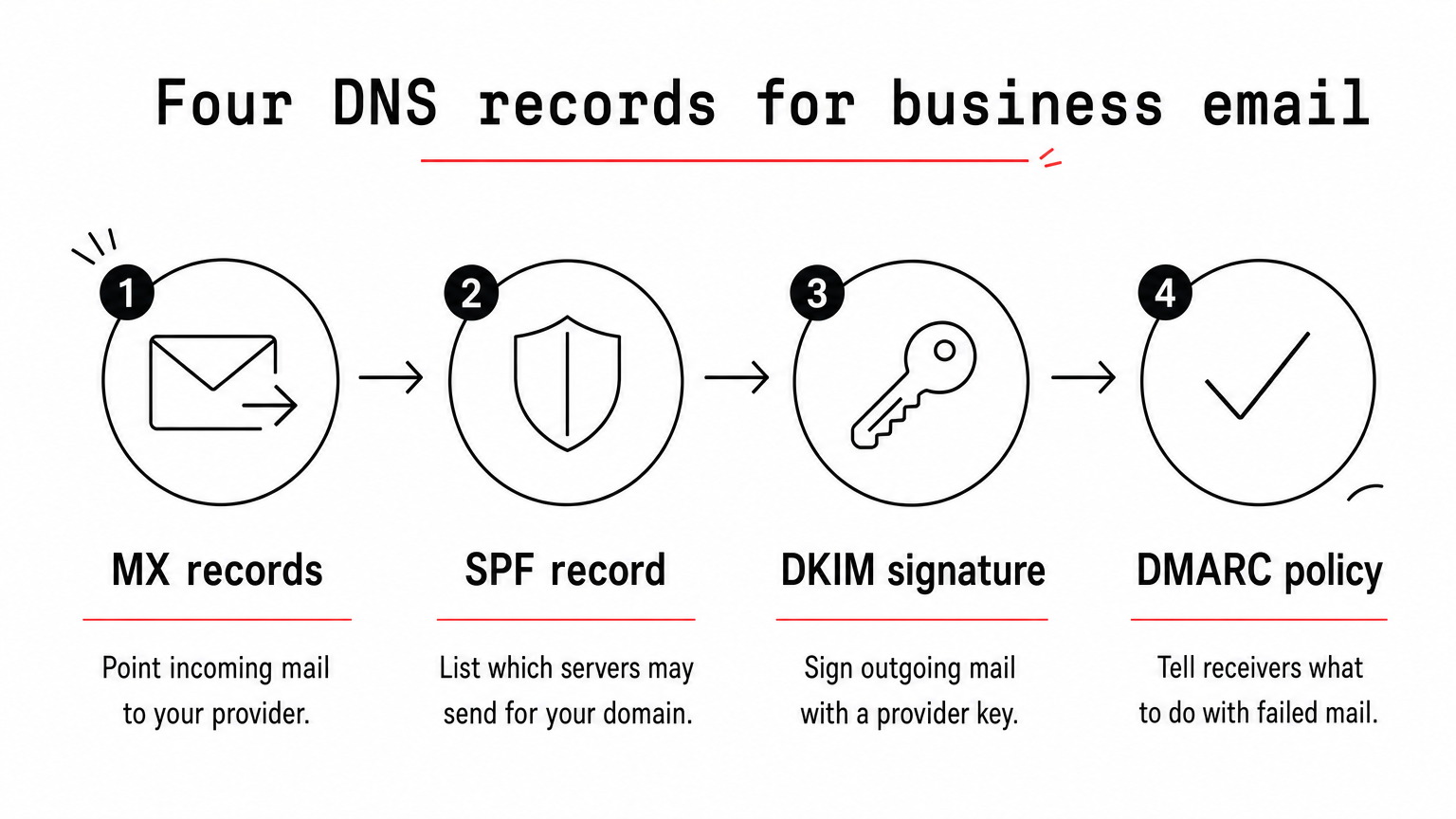
- MX records send incoming mail to your provider. Your provider lists the exact values.
- SPF is a TXT record that lists who may send for your domain. Keep only one SPF record.
- DKIM adds a signature to outgoing mail, using a key your provider generates.
- DMARC tells receiving servers what to do with mail that fails the first two checks.
Here is an SPF record for Google Workspace and a starter DMARC record that only monitors:
yourdomain.com   TXT   "v=spf1 include:_spf.google.com ~all"
_dmarc.yourdomain.com   TXT   "v=DMARC1; p=none; rua=mailto:you@yourdomain.com"
Replace the domain and address with your own, and use the include value your own provider gives you. Once reports show clean mail, tighten the DMARC policy.
Moving without losing mail
Create the new mailboxes first, copy old mail across with your provider's IMAP migration tool, then change the MX records. Lowering the TTL on your MX records a day earlier speeds the switch. Keep the old mailboxes for a week, in case a message arrives late.
Add MX, SPF, DKIM and DMARC records on day one, because a mailbox without them sends into spam.
Choosing and sticking with one setup
For a small site with a few low-volume addresses, hosting-bundled email from Hostinger, Namecheap or SiteGround is enough. When mail carries invoices, customers or a team, a dedicated provider is worth a few dollars per person. Google Workspace is the default for most teams, Zoho is the budget choice, Microsoft 365 suits Outlook offices, Fastmail suits email-only users, and Proton Mail suits sensitive work.
Whichever you pick, set up the DNS records on the first day and keep your website and inbox independent where you can. If you are still choosing a host for the website side, find more plain-language guides on web hosting and site building at Trick and Tech.


