
Freelancing: 10 Best Platforms to Find Remote Jobs Online
The best way to start freelancing online is to pick one platform that fits your skill and experience, then send a few focused proposals or publish a clear service offer. A good platform has clients in...

The best way to start freelancing online is to pick one platform that fits your skill and experience, then send a few focused proposals or publish a clear service offer. A good platform has clients in your field, fees you can live with, and payment protection. Beginners and students do well on Fiverr, Freelancer.com, and Contra. IT specialists should look at Freelancermap, Arc, and Toptal. Upwork suits anyone who is comfortable pitching, and Useme helps when you already have clients and need clean contracts and payouts.
The real problem is choice. Dozens of freelancing websites promise easy income, fees run from 0% to 20%, and a wrong pick can cost you weeks of unpaid proposals. Some sites also screen applicants, while others are crowded with low bids.
This guide explains what freelancing is, then compares ten platforms on how they work, what they cost, and who they suit. At Trick and Tech we write for beginners who want to earn online, so you also get a fee comparison with a worked example and a simple plan for landing your first project.
What freelancing is and how it works online
Freelancing means selling a skill to clients as a self-employed person instead of working for one employer. You pick projects, set rates, and invoice each client yourself. Online platforms make this practical by connecting you with clients and handling contracts and payments.
What a freelancer actually does
A freelancer is paid per project, per hour, or on a monthly retainer, not a salary. That means you also handle finding clients, pricing, taxes, and your own equipment. Freelancing work can be a one-off logo or a six-month development contract.
The trade-off is control against stability. Income arrives unevenly, but you decide what to take on and when. Most people begin on the side, next to studies or a job, and treat it as a freelancing career only once the income is steady.
Freelancing trades a fixed salary for control over what you work on, when, and for whom.
Freelance jobs you can do from home
Any skill with a clear deliverable can be sold online. The most common freelancing jobs from home fall into these groups:
- Writing and editing: articles, product descriptions, proofreading.
- Graphic design: logos, social media graphics, book covers.
- Web and software development: websites, apps, scripts, and the wider field of IT freelancing.
- Video and audio editing: short clips, podcasts, voice-overs.
- Virtual assistance and data entry: inbox management, scheduling, research.
- Translation and transcription: document translation, subtitles.
- Digital marketing: SEO, social media management, ad campaigns.
If you have no paid experience yet, pick the skill where you can produce a sample in a weekend. A client trusts a finished sample more than a promise.
How freelancers earn money online
Online freelancing platforms fall into four types. Bidding marketplaces such as Upwork and Freelancer.com let you answer client job posts. Gig marketplaces such as Fiverr let clients buy your packaged service. Vetted networks such as Toptal and Arc screen you first and then match you with clients. Portfolio and payment tools such as Contra and Useme help you win clients elsewhere and get paid.
Your first jobs will pay less than your target rate, because you have no reviews. After a handful of completed projects with good feedback, you can raise prices. Always calculate what you keep after platform fees before you quote anyone.
1. Upwork
Upwork is the broadest general marketplace for freelancing jobs online, with categories from writing and design to development and data entry.
How it works
Clients post a job, and you reply with a proposal that explains your approach and price. Each proposal uses credits called Connects, so write fewer, better proposals instead of copying one message everywhere. Contracts are hourly or fixed price, and payment runs through the platform.
The range of categories is what makes Upwork attractive. Writers, developers, designers, and virtual assistants all find steady demand, and many clients return for repeat work.
Fees and payment
Upwork charges a variable service fee of 0 to 15% on new contracts, and most freelancers report landing around 10 to 12%. Check the current fee page before you set prices, because the structure has changed in the past.
- Fee: variable, up to 15% on new contracts.
- Cost to apply: Connects are needed for proposals.
- Contract types: hourly and fixed price.
Who it suits
Upwork suits freelancers who are comfortable pitching and want long-term clients. The catch is competition: you will send several proposals before your first win. A narrow profile headline such as "WordPress speed fixes" gets more replies than "web developer".
On Upwork, a short, specific proposal beats a long generic one.
2. Fiverr
Fiverr is the easiest start for beginners who can package a skill into a clear service, because clients come to you instead of the other way round.

How it works
You publish "gigs", which are fixed-price offers such as a logo, a 500-word article, or a video edit. You set the price, delivery time, and what is included. Clients browse hundreds of categories and buy the gig they like.
Visibility depends partly on reviews and sales, so your first orders matter most. Expect the early weeks to be slow while the gig has no history.
Fees and payment
Fiverr keeps 20% of every payment you receive. A $50 gig pays you $40.
- Fee: 20% on every order.
- Pitching: none, clients buy directly.
- Visibility: ranked by an algorithm that rewards reviews.
Who it suits
Students and beginners with a packageable skill do well here, especially in logo design, voice-over, book covers, and editing. It is one of the more approachable freelancing websites for students because there are no proposals to write.
The downside is the 20% cut, which is the highest among major sites. Price your first gigs low enough to win reviews, but never below what you would still accept after the fee.
Fiverr rewards you for packaging one skill clearly, not for offering everything.
3. Freelancer.com
Freelancer.com is a high-volume bidding platform where freelancing projects of every size are posted daily, from $30 fixes to long contracts.
How it works
You browse projects and place a bid with your price and a short pitch. The client picks a freelancer, and payment is released in milestones as work is approved. The platform also runs contests, where you submit an entry and the client pays only the winner.
Speed matters. The site says 80% of jobs receive bids within 60 seconds, so turn on alerts and reply early.
Fees and payment
The service fee is 10% or $5 per project, whichever is higher. On a $500 project you pay $50. On a $30 project the $5 minimum applies, which is about 17%.
- Fee: 10% or $5 minimum per project.
- Payment: milestone-based.
- Scale: over 90 million registered users, according to its own homepage.
Who it suits
It suits beginners who can handle volume and competition. The catch is price pressure: bidding wars can push rates down. Do not bid the lowest. Offer a clear plan and a fast reply, and let your portfolio justify a fair price.
4. PeoplePerHour
PeoplePerHour is a UK-based marketplace that combines custom proposals with fixed-price packages called Hourlies, so you can sell in both ways.
How it works
You can respond to client job posts with proposals, or list Hourlies that clients buy directly. You set your own rates and manage your hours. Payments are held in escrow until the client approves the work.
Free proposals are limited, so choose projects carefully instead of applying to everything.
Fees and payment
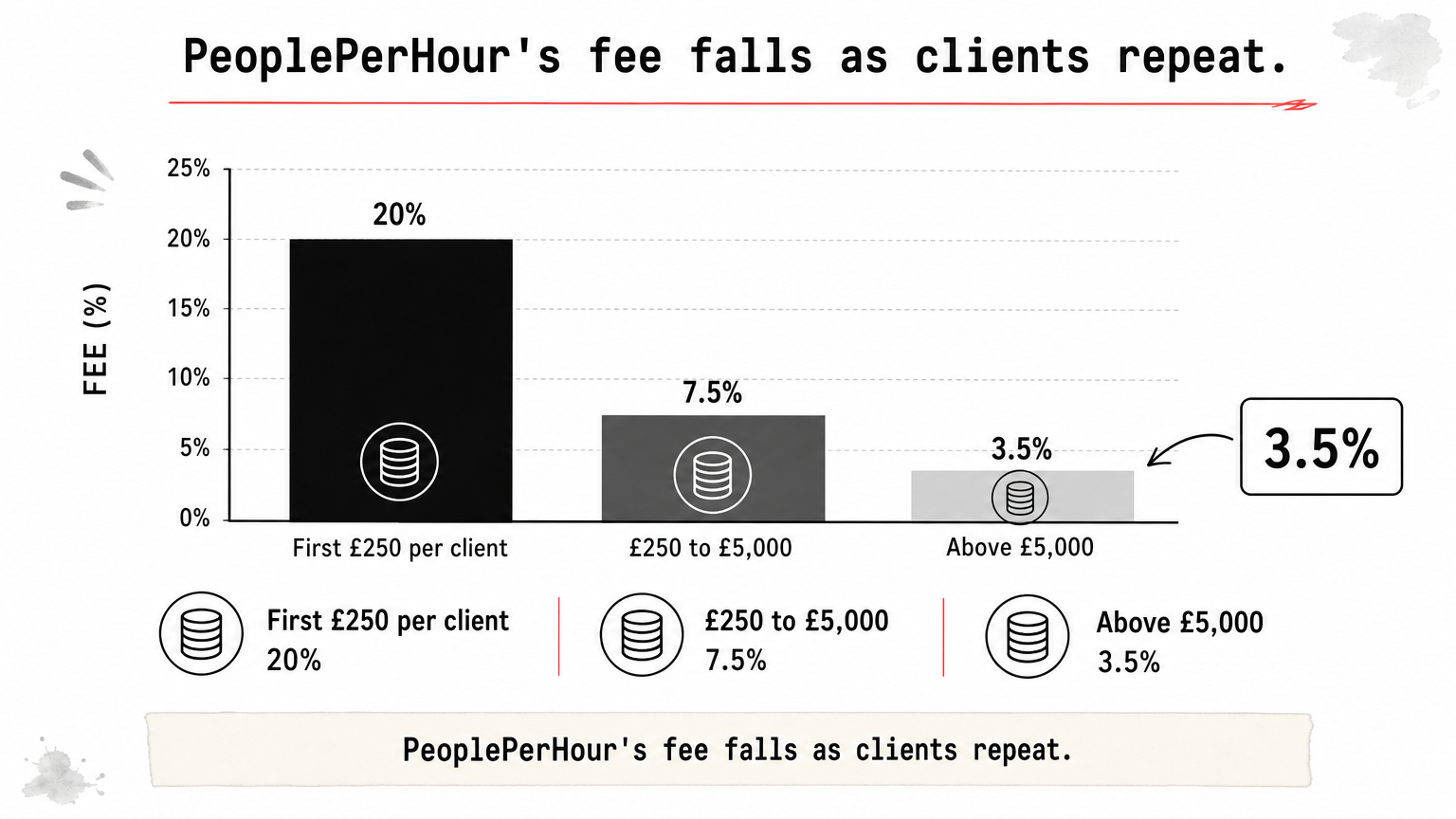
The fee is tiered per client: 20% on earnings up to £250, 7.5% from £250 to £5,000, and 3.5% above that. On a £1,000 job from one client, the fee is £50 plus £56.25, which is £106.25. You keep £893.75.
- First £250 per client: 20%.
- £250 to £5,000: 7.5%.
- Above £5,000: 3.5%.
Who it suits
It suits freelancers who want bidding and packages in one place and expect repeat work from the same clients. Repeat clients matter because the fee falls as your total with them grows. The catch is that small first jobs carry the heaviest cut, so price them with that in mind.
On PeoplePerHour, repeat clients are what make the sliding fee work for you.
5. Toptal
Toptal is a vetted network for experienced professionals, and it is a target to work toward, not a place to start.

How it works
You apply and go through screening before you see any client work. Toptal markets itself as accepting only the top 3% of applicants in business, design, and technology. Once accepted, you are matched with clients instead of bidding.
Matching can be slower than on open marketplaces, so treat it as a long-term channel.
Fees and payment
Toptal charges freelancers nothing. You receive your quoted rate, and the company earns by billing clients at a higher rate. The exact margin is not public.
- Fee to you: 0%.
- Pricing: you set the rate, clients pay a markup.
- Bidding: none.
Who it suits
It suits senior developers, designers, and finance or product experts with years of proven work. Beginners will struggle to pass screening. If you are not there yet, build a track record on another platform first, and apply once you have a portfolio of complex projects.
Toptal pays well because it filters hard, so apply when your portfolio is already strong.
6. Contra
Contra is a commission-free platform that works as a portfolio, a network, and a payment tool in one place.
How it works
You build a profile that showcases your projects, and clients can find you or you can apply to opportunities. Invoicing and payments sit inside the same account, so you do not need separate tools for each.
Think of it as a professional page you own, with a marketplace attached.
Fees and payment
Contra charges no commission, so you keep your full earnings. Payment processors may still charge their own fees, so check before you quote.
- Commission: 0%.
- Extras: some paid upgrades are offered.
- Strength: personal branding tools.
Who it suits
It suits students and early-career designers, developers, and creators who want a free, professional portfolio. It is one of the best freelancing websites to earn money from without losing a share to fees.
The catch is a smaller client pool than the big marketplaces. You have to bring your own traffic, so share your Contra link on social media and in every proposal elsewhere.
Contra works best as the home for your portfolio, not as your only source of clients.
7. Freelancermap
Freelancermap is a project board with a strong focus on IT, which makes it a good fit for IT freelancing.
How it works
You create a profile, search listings, and apply to projects that match your skills. According to its own site, it lists more than 14,000 IT projects and has over 190,000 freelancers. Clients reach you through your profile or your applications.
Read each listing closely. Some require a specific language, time zone, or location.
Fees and payment
The site advertises 0% commission, so you negotiate your rate directly with the client. Check which features, such as alerts or profile visibility, need a paid membership.
- Commission: 0%.
- Focus: IT and tech projects.
- Payment: agreed with the client, so set your own terms.
Who it suits
It suits developers, data specialists, DevOps engineers, and IT project managers who already have some experience. Because payment is arranged directly, use a written contract and invoice on time. Beginners can still use it to see what skills and rates clients ask for.
8. Arc
Arc connects developers, designers, and marketers with vetted remote jobs from startups and tech companies.
How it works
You create a profile and the platform matches you with openings, with career support along the way. Employers are screened, so listings are generally better quality than open job boards.
Some premium access depends on a stricter vetting step, so expect a review of your skills.
Fees and payment
Arc charges freelancers a 0% service fee. Third-party payment processing fees may still apply, so check the payout details.
- Service fee: 0%.
- Processing: third-party fees may apply.
- Matching: personalized, not bid-based.
Who it suits
It suits mid-level to senior remote tech professionals who want high-paying, curated work. Roles outside tech are limited, and strict vetting can block newcomers. If you are early in your IT career, build two or three solid portfolio projects first, then apply.
Arc is for tech professionals who prefer being matched with serious employers over bidding.
9. Useme
Useme is less a job marketplace and more a way to get paid properly, with contracts, invoices, and payouts in one place.
How it works
You can find work on its job board or invite clients you already have. Useme generates the contract, issues the invoice, and handles the payment. A demo mode lets you test the whole flow before using it with a real client.
It supports multiple currencies and withdrawal methods, which helps when your clients are abroad.
Fees and payment
According to Useme, the service fee is 4.99% with a monthly limit, paid by only one side of the contract, and there is no monthly subscription. Payouts usually arrive within 24 hours of the client's payment being confirmed. On a $500 project, a 4.99% fee costs $24.95, so you keep $475.05.
- Fee: 4.99%, paid by one party.
- Subscription: none.
- Payout: usually within 24 hours.
Who it suits
It suits freelancers who already have clients and want proper paperwork without registering a company. There is no mobile app, and fewer job offers appear in some industries. A generated invoice does not replace your own tax duties, so check the rules in your country.
10. Clickworker
Clickworker is a micro-task platform, and it is the lowest-barrier way to earn your first online income.
How it works
You register, choose tasks that match your language and skills, and complete them one by one. Typical tasks include surveys, data categorization, text correction, and short research jobs. Payment is per task.
It is closer to online gig work than full freelancing, since you do not pitch clients or build a client list.
Fees and payment
Pay per task is low. Check payout thresholds and withdrawal methods before you spend hours there.
- Pay model: per completed task.
- Entry barrier: very low.
- Earning potential: low, not a career base.
Who it suits
It suits students and complete beginners who want flexible side income and a feel for working online. The catch is simple: it will not build a freelancing career. Use it to learn the routine of delivering work on time, then move to a platform where you can set your own rates.
Clickworker is a starting point for habits and pocket money, not a long-term plan.
Choosing a platform and landing your first project
Choose the platform by your situation, compare what you actually keep after fees, and follow a short plan for your first project.
Match the platform to your situation
Use this as a starting point:
- Students and total beginners: Fiverr, Freelancer.com, Contra, and Clickworker for first income.
- Writers, designers, and assistants wanting repeat clients: Upwork and PeoplePerHour.
- IT freelancers: Freelancermap, Arc, Toptal, and Upwork.
- Freelancers with their own clients: Useme for contracts and payouts.
- Experienced specialists: Toptal and Arc.
Start with one platform, not five. Being visible on two platforms beats being invisible on six.
Compare fees with a worked example
Here is what you keep from a $500 project, before payment processing, currency conversion, and withdrawal fees. Fees change, so confirm them on each platform's own page.
| Platform | How you get work | Platform fee | You keep from $500 |
|---|---|---|---|
| Upwork | Proposals | 0 to 15%, variable | $425 to $500 |
| Fiverr | Gigs | 20% | $400 |
| Freelancer.com | Bids and contests | 10% or $5 minimum | $450 |
| PeoplePerHour | Proposals and Hourlies | 20%, 7.5%, 3.5% tiers | £431.25 from a £500 job |
| Toptal | Vetted matching | 0% | $500 |
| Contra | Profile and applications | 0% | $500 |
| Freelancermap | Project applications | 0% | $500 |
| Arc | Vetted matching | 0% | $500 |
| Useme | Own clients and job board | 4.99% | $475.05 |
| Clickworker | Micro-tasks | Paid per task | Not applicable |
A zero fee does not mean easier money. Fiverr takes the most, but it can also bring clients to you. Vetted networks charge nothing and demand the most experience.
Land your first project
Follow these steps:
- Pick one skill and one platform.
- Write a specific headline and add two or three samples. If you have no client work, make sample projects yourself.
- Price your first jobs modestly for reviews, but set a floor after fees.
- Send a handful of tailored proposals each week, each mentioning the client's exact problem.
- Deliver early, communicate clearly, and ask for a review.
- Raise your rate after several good reviews.
Avoid scams and grow beyond the platform
Never pay to get hired, and be careful when a client wants to move the chat or payment off the platform before a contract exists. You lose payment protection when you do. Check that the platform pays out in your country before you sign up.
Repeat clients are the foundation of a freelancing career. Over time, the best ones may hire you again directly, but read each platform's terms first. Also learn your local tax rules, and talk to a qualified adviser if needed, because you now handle them yourself.
Start small and keep learning
Freelancing rewards a narrow skill, a clear offer, and patience through the first few reviews. For most beginners, Fiverr, Freelancer.com, or Contra is the easiest start, Upwork is best for repeat clients, and Freelancermap, Arc, and Toptal serve IT professionals. Compare fees, check payout options, and stay on one platform until you have results.
If you want practical help with the tools around this, such as AI assistants for proposals or ways to earn online, read more beginner-friendly earning guides on Trick and Tech.


