
3 Reliable Ways to Find Active Borderlands 4 SHiFT Codes
The most dependable way to get active Borderlands 4 SHiFT codes is to take them straight from the source. Use the official Borderlands and Gearbox social accounts if you want speed, the Gearbox newsle...

The most dependable way to get active Borderlands 4 SHiFT codes is to take them straight from the source. Use the official Borderlands and Gearbox social accounts if you want speed, the Gearbox newsletter if you want codes in your inbox, and community threads as a quick cross-check. Every code is universal, so the same code works on PS5, Xbox and PC. The Golden Keys it gives you open the golden loot chests in the game's hub towns.
A static list has one big problem. Gearbox's own guide says SHiFT codes are often time-limited, so a code pasted into an article can expire before you read it. A dead code wastes your time and makes you doubt your account. This guide skips the stale list and shows you where fresh codes appear first, how to check them, and what to do with the keys.
At Trick and Tech we cover Borderlands news for players who want a straight answer. Below you get three trustworthy sources, the exact redeem steps for the website and the game, and advice on when to spend your Golden Keys.
1. Official Borderlands and Gearbox social accounts
The official social accounts are the fastest source of new SHiFT codes, because the codes start there. The Borderlands channel, Gearbox Software and Randy Pitchford post them, usually with the reward and an expiry date.
How it works
A code is 25 characters long, written as five groups of five letters and numbers. Recent drops have given 2 or 3 Golden Keys per code, and each post states when the code expires. Copy the code from the post and paste it, because one mistyped character makes it fail.
The official accounts publish a code first, so every other list you find is a copy.
Who it suits
This source suits players who want new codes the moment they go live. Turn on post notifications for the accounts above. A code that is a few hours old is far more likely to still work than one that has been reposted for days.
What to watch for
Check the account handle before you trust a post, because fake giveaway accounts copy the official look. Also note the expiry date and redeem the same day. Never type your SHiFT login into any site except the official one.
2. The Gearbox newsletter and 2K emails
The newsletter is the lowest-effort way to collect codes, since they arrive in your inbox. You do not need to watch feeds, and you cannot miss a post.
How it works
Sign in on the SHiFT website and open the preferences on your profile page. Tick the box to receive news and promotions from 2K and its affiliates, and the box to stay subscribed to the Gearbox newsletter. Per 2K's guide, a Borderlands email may contain a SHiFT code, and the expiry date is stated in that email.
Subscribe once, and the official codes come to you.
Who it suits
Casual players who log in a few times a week suit this source best. You skip the daily check and still collect the codes that Gearbox sends to subscribers.
What to watch for
Email codes often have their own end dates, so read the message before you save it for later. Check your spam folder if nothing arrives after signing up. Remember that each code works once per SHiFT account, so sharing one with a friend only helps if they have not used it.
3. Community code trackers and Reddit threads
Community threads are the best backup when you missed a post. Players on Reddit and fan sites collect codes from the official channels and keep running lists, so you can scan several at once.
How it works
Search the Borderlands 4 subreddit for an "active SHiFT codes" thread and read the newest comments first. Many tracker pages sort the newest codes to the top. Treat every entry as a lead to verify, and look for the original official post before you rely on it.
Use community lists to find codes, and use official posts to confirm them.
Who it suits
This source suits players who missed a drop or came back after a break. It is also useful when you want every currently active code in one place.
What to watch for
Old codes linger in threads long after they expire, so match the expiry date against the official post. Also redeem only on the official SHiFT site or in the game, never on a page that asks for your password.
Redeem Borderlands 4 SHiFT codes on PS5, Xbox and PC
You redeem a code in one of two places: the Rewards tab on the official SHiFT website, or the Rewards tab of the SHiFT menu inside the game. Both work the same on every platform, because SHiFT codes are not tied to one console.
Redeem on the SHiFT website
- Sign in at the SHiFT site with your SHiFT account.
- Under Gaming Platforms, link your PlayStation, Xbox or PC account if you have not already.
- Open the Rewards tab and paste the code into the redemption field.
- Launch Borderlands 4 signed in to the same SHiFT account to receive the reward.
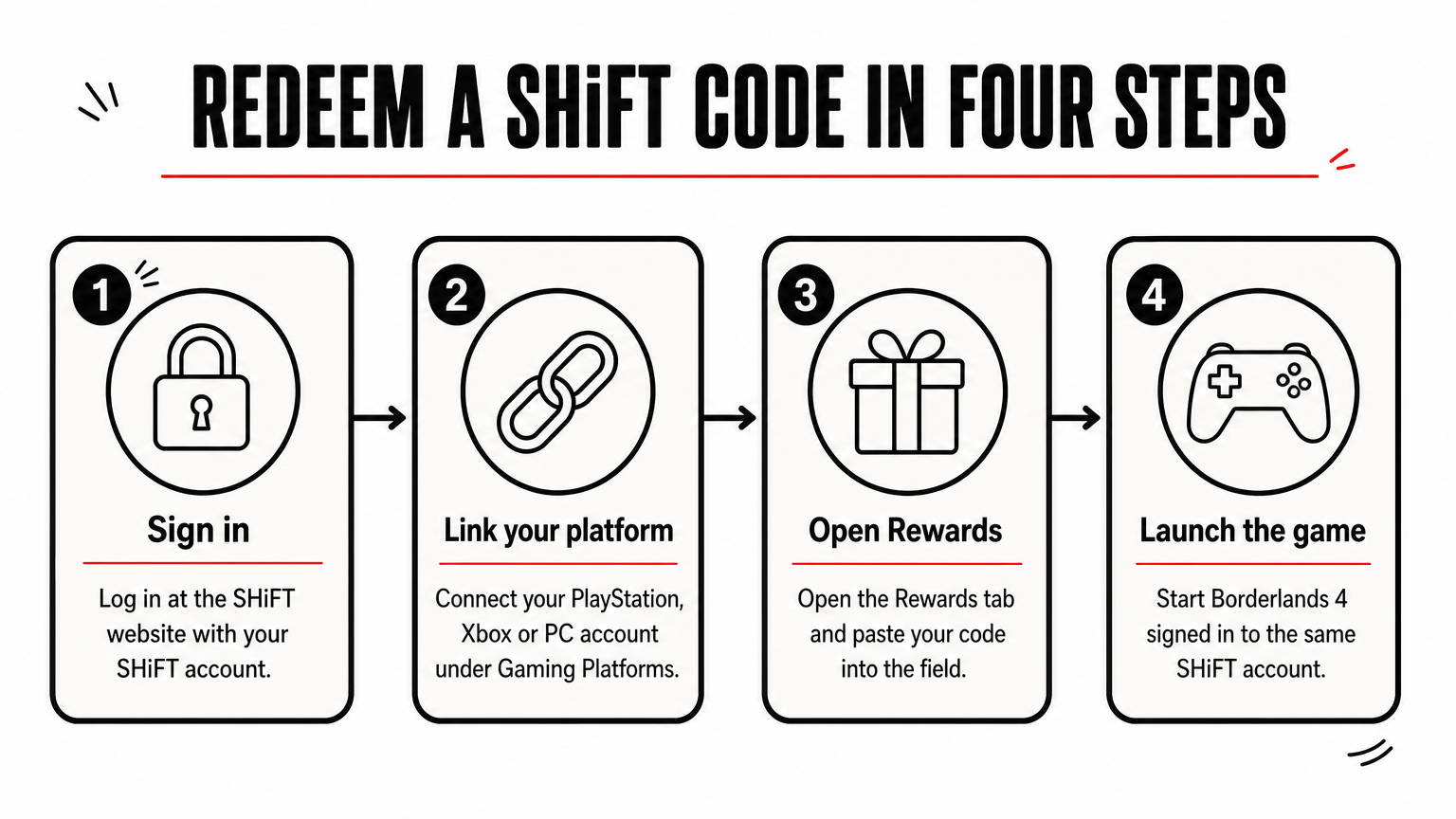
Link your platform account first, or a redeemed code has nowhere to go.
Redeem in the game on PS5, Xbox or PC
Open the SHiFT menu from the main menu or the pause menu, go to the Rewards tab, and enter the code in the Code Redemption field. This route is the quickest on a console, because you do not need a second device. If you are also searching for shift keys in Borderlands 4, those are the Golden Keys, and they appear after a successful redemption.
Fix a code that will not redeem
First try the code again, because the service sometimes has hiccups. If it fails on the site, try the game, and the other way round. Some codes need your 2K account linked to SHiFT, which you can do on the SHiFT associations page. If a valid code still fails, contact 2K Support and include your SHiFT Support ID from your profile page.
Where to spend your Golden Keys
Golden Keys open Golden Chests, which sit in each faction's main hub town and show on the world map and compass. Opening one costs 1 key.
Open a Golden Chest
The loot is high quality and often Epic. There is also a small chance of a Legendary or Pearlescent item, but only from the world drop pool. That means a chest will not give you a specific boss drop, so treat it as a boost, not a build tool.
One key buys one chest, and the best use is to spend it while you level.
When to spend them
My view is that you should use keys while leveling, since an Epic or better piece helps most when your gear is weak. At max level you will be farming particular sources for the Legendary items your build needs, and chest loot matters less. Hoarding keys for that stage makes little sense.
Stay ready for the next drop
Fresh codes come from the official accounts first, reach your inbox through the newsletter, and get collected in community threads. Redeem them on the SHiFT website or in the game's Rewards tab, link your platform and, when needed, your 2K account, and spend the Golden Keys while you level.
Set up your notifications and newsletter once, and you will see new codes without hunting for them. For more Borderlands 4 news and practical gaming guides, visit Trick and Tech.


