
Borderlands 4 Map: 5 Best Interactive Maps for Kairos
The best Borderlands 4 map depends on how you play. Map Genie suits completionists who want a 100% checklist. MapMaster suits players who clear one area at a time. The Fextralife wiki map suits anyone...

The best Borderlands 4 map depends on how you play. Map Genie suits completionists who want a 100% checklist. MapMaster suits players who clear one area at a time. The Fextralife wiki map suits anyone who wants vendors and utility pins. Game8's map suits quick lookups with guide links. The Google Play app suits Android players who want a map on their phone. Kairos is one seamless world, so "how many maps" really means "which tool".
The problem is the world itself. Borderlands 4 has no minimap, only a compass, and Echo Logs, Vault Symbols, red chests and Dead Bolts are easy to miss. Some regions also stay closed until you progress the story. An interactive map with filters and progress tracking saves hours of wandering.
This article compares five tools by what they track, how they work and who they suit. After the list, you get a short section on how Kairos is divided, plus a side-by-side table. We cover Borderlands news here, including the C4SH Vault Hunter DLC, so we focus on what each map actually offers.
1. Map Genie
Map Genie is the most category-heavy Borderlands 4 interactive map in this list. It is the pick if your goal is to find every collectible. It is a dedicated map site with a separate guide page for almost every pin type.

What it tracks
Its listing covers Echo Logs, Vault Symbols, side missions, bosses, red chests, Marcus bobbleheads, Dead Bolts and points of interest. The guide index goes further:
- Auger Shrines, Electi Safes, Evocarium and Lost Capsules
- Propaganda Speakers, Survivalist Caches and Vault Fragments
- Abandoned Auger Mines, Order Silos, Order Bunkers, Ripper Drill Sites and Ancient Crawlers
- Safehouses, fast travel locations, vending machines, named enemies and world events
How it works
You filter the map by category and open the matching guide page for details on each location. A dedicated 100% checklist page tracks overall progress. Check the site itself for how progress saving works before you rely on it across devices.
Who it suits
It suits completionists chasing every collectible. If you only want the next red chest, the category list may feel like more than you need.
Choose Map Genie when your goal is 100% completion and you want a guide page behind every pin type.
2. MapMaster
MapMaster splits Kairos into many smaller maps instead of one huge canvas. It is a good Borderlands 4 map if crowded pins slow you down. Its hub page lists 28 interactive maps.
What it tracks
Those 28 maps cover every area across all four regions. Each one carries collectibles, missions, named enemies and chests for that area. The site bills itself as a completion hub, so tracking what you have found is the point of the tool.
How it works
You pick the area you are standing in and open its map. Each area shows only its own pins, so the screen stays readable. This mirrors how the game unlocks: regions open as you push through the story.
Who it suits
It suits players who clear the game region by region. If you want everything on a single screen to plan a long route, one of the single-canvas tools will fit better.
MapMaster trades the big overview for focus: one area, one clean map, fewer missed pins.
3. Fextralife Borderlands 4 wiki map
The Fextralife wiki map is the best fit when you want utility locations, not only collectibles. It lives inside a full wiki, so every pin sits near item, boss and walkthrough pages.
What it tracks
Its pin list includes vendors and services such as Maurice's Black Market, Moxxi's Big Encore, the Bank of Kairos, Respec Machines, Firmware Transfer Machines and Lost Loot Machines. It also covers fast travel stations, vault entrances, mission givers and world events such as the Airship, Creep Impact and Goredello events. The usual collectibles are there too, including ECHO Logs, Vault Symbols, Dead Bolts, Lost Capsules and red chests.
How it works
Use the search bar with partial keywords, or click a category in the left sidebar to show only that pin type. Tick Mark as Completed on any pin you have found. VIP Members also see completion rates for each category, so full progress tracking sits behind that membership.
Who it suits
It suits players who want to know where the vendors, bank and respec machine are, not only where the loot is. Free users get the filters and checkboxes, but not the completion percentages.
The Fextralife map is the one to open when you need a shop or a service, not just a collectible.
4. Game8 interactive map
Game8's map is the quickest to learn and the best linked to guides. It is a clean Borderlands 4 map with a short list of controls and plenty of guide pages one tap away.
What it tracks
It shows all collectibles and points of interest across Kairos, organized by region and area. Pin categories include missions, enemies, activities, areas of interest and collectibles. The surrounding wiki adds pages for bosses, safehouses, Auger mines and the Black Market location.
How it works
Open the sidebar with the arrow in the upper left corner on PC, or the upper right on mobile. The controls are simple:
- Pin search finds pins that match text you type.
- Show All and Hide All toggle every pin at once.
- Clicking a pin type shows or hides that category.
- A dropdown selects the map when several are available.
- Clicking a pin opens a window where you can mark it collected, leave a comment or copy a link.
Who it suits
It suits casual players and mobile readers who want a fast answer and a link to the related guide. The pin window's "copy link" button is handy for sharing a location with a co-op partner.
Game8 wins on speed: open it, search a pin name, mark it collected, move on.
5. GM: Borderlands 4 Map app
The GM: Borderlands 4 Map app is the only Borderlands 4 map download here that installs like a real app. It is listed on Google Play, so it is aimed at Android phones and tablets.
What it tracks
The listing advertises more than 1,400 markers. It names red chests, bosses, side missions and legendary weapons as the main finds. That makes it a loot-first map, useful for farming routes more than for 100% completion.
How it works
You install it and use it as a second screen while the game runs on your console or PC. A native app can keep your place on your phone without browser tabs getting in the way. Check the listing for update dates and recent reviews before you install, since a map app is only as good as its latest patch.
Who it suits
It suits Android players who farm red chests and legendaries. iPhone owners should use one of the browser tools above instead. The browser-based maps in this list need no installation.
Pick the app if your phone is your second screen and your goal is loot, not completion percentages.
How big the Borderlands 4 map is and how it is split
Borderlands 4 has one connected world, not a set of separate levels. The confusion comes from tools that cut that world into several map views.
How many maps Borderlands 4 has
Kairos is a seamless open world with no loading screens between regions. Its size is larger than any earlier Borderlands map, which is why exploration matters more here. There is no minimap, so the HUD uses a compass that shows points of interest with the same icons you see on the map. So yes, the game is effectively one map, and tools such as MapMaster's 28 views are slices of it.
Borderlands 4 is one big map; every tool in this list is a different way to slice and filter it.
Regions and areas
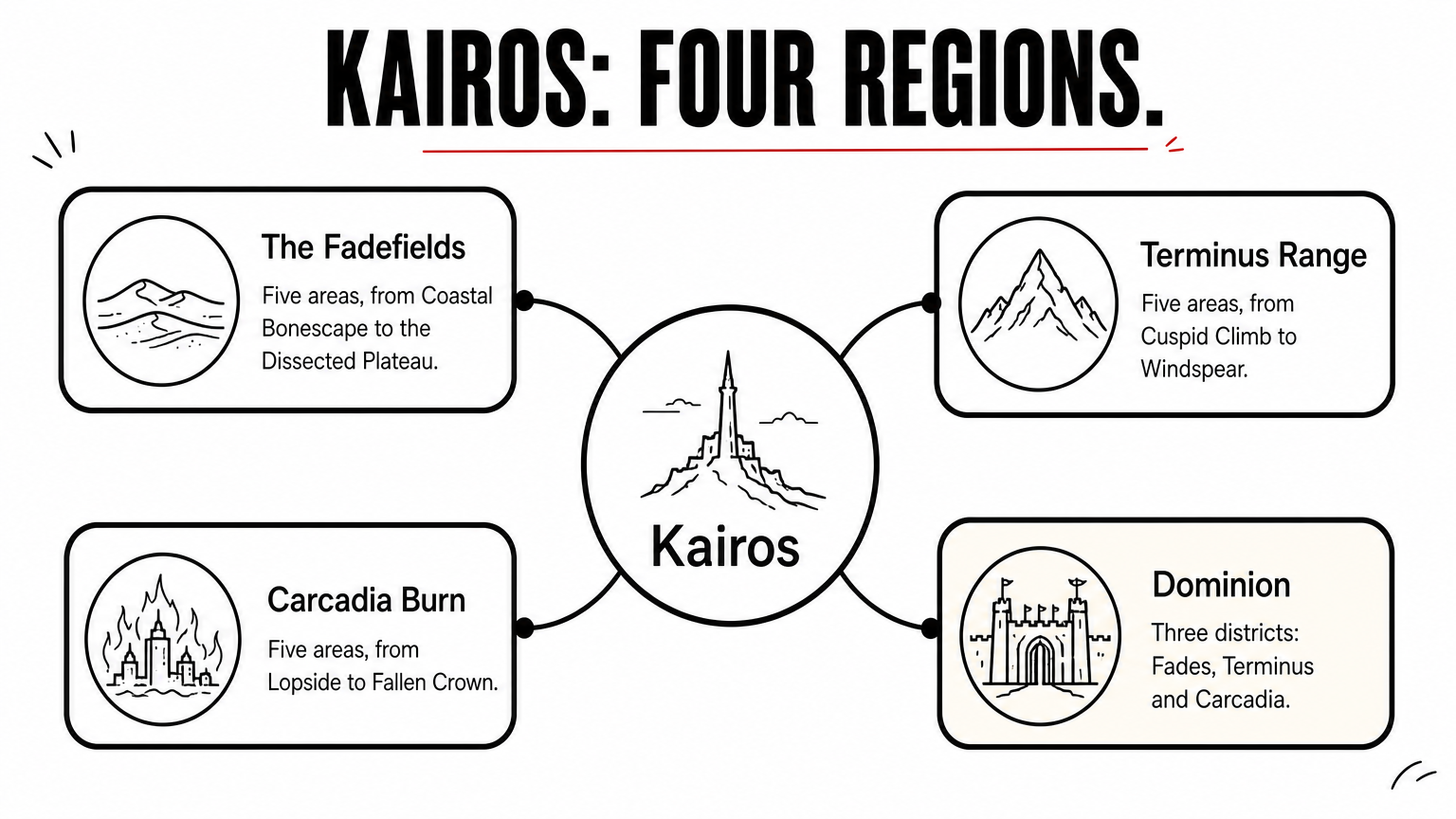
Kairos has four major regions, and many areas require story progress to unlock. Game8 lists the areas below. Another source counts 14 primary locations, so totals vary with how districts and sub-areas are grouped.
| Region | Areas |
|---|---|
| The Fadefields | Coastal Bonescape, The Howl, Hungering Plain, Idolator's Noose, Dissected Plateau |
| Terminus Range | Cuspid Climb, Heart of the Mountain, Stoneblood Forest, The Low Leys, Windspear |
| Carcadia Burn | Lopside, Grindstone of the Worthy, Tonnage Peel, Ruined Sumplands, Fallen Crown |
| Dominion | Fades District, Terminus District, Carcadia District |
Which tool to pick
Match the tool to your goal, not to a brand. If you own DLC, check that your chosen map lists the new content before you trust it.
| Tool | Standout | Best for |
|---|---|---|
| Map Genie | Guide page per pin type, 100% checklist | Completionists |
| MapMaster | 28 area maps | Region-by-region play |
| Fextralife | Vendors, bank, respec pins | Utility locations |
| Game8 | Pin window with guide links | Quick lookups |
| GM: Borderlands 4 Map | 1,400+ markers on Android | Loot farming |
Pick a map and start marking pins
Kairos is one huge, seamless world with no minimap, so a good interactive map pays for itself quickly. Use Map Genie for full completion, MapMaster for focused area maps, Fextralife for vendors and services, Game8 for fast lookups and the Android app for loot runs. Start with one tool, mark what you find, and switch only if it stops fitting.
For more guides and gaming coverage, visit Trick and Tech and follow our Borderlands 4 news.


