
7 Best Web Hosting Services for Small Businesses in 2026
The best web hosting services for small businesses combine a low entry price with honest renewal rates, built-in security, and support that answers when your site breaks. Hostinger is the best all-rou...

The best web hosting services for small businesses combine a low entry price with honest renewal rates, built-in security, and support that answers when your site breaks. Hostinger is the best all-round value. DreamHost suits owners who want human chat and a long refund window. Bluehost fits first-time WordPress users. SiteGround suits sites with growing traffic. IONOS suits businesses with seasonal spikes. ScalaHosting suits security-minded stores and anyone heading toward a VPS. Hosting.com suits beginners.
The hard part is not finding a cheap plan. It is that the price on the ad is rarely the price you pay for long. A plan advertised at under $3 a month often needs a multi-year commitment, then renews at several times that amount. Add checkout upsells, thin email limits, and conflicting reviews, and the choice gets confusing fast.
This article ranks seven hosts for small business owners. You get a side-by-side table first, then a short profile of each host that covers features, pricing, drawbacks, and who it suits. After that you get a guide to choosing a hosting type and the real cost of hosting. We ranked on what each host publishes about its plans, renewal behavior, security tools, speed technology, support, and refund terms.
Best web hosting services for small businesses at a glance
Here are the seven picks side by side, followed by the criteria that decided their order. If you only want a quick answer, read the table and jump to the host that matches your situation.
Quick comparison table
The table shows what each host is best at, its standout feature, and its refund window. Prices are covered in each profile, because the same plan appears at very different figures depending on the billing term.
| Rank | Host | Best for | Standout feature | Refund window |
|---|---|---|---|---|
| 1 | Hostinger | Overall value, multiple sites | Several sites on the base plan, LiteSpeed, CDN | 30 days |
| 2 | DreamHost | Support and a long guarantee | 24/7 live chat, unmetered bandwidth | Up to 97 days on shared plans |
| 3 | Bluehost | WordPress and WooCommerce | Official WordPress.org recommendation | 30 days |
| 4 | SiteGround | Speed and growing traffic | Google Cloud infrastructure, staging tools | 30 days |
| 5 | IONOS | Scalability | Raise CPU and memory on any plan | 30 days |
| 6 | ScalaHosting | Security and VPS upgrades | SShield scanning, SPanel, NVMe storage | Check terms |
| 7 | Hosting.com | First-time site owners | Free migration, simple control panel | 30 days |
The cheapest sticker price is rarely the cheapest plan once renewal arrives.
How the picks were ranked
The ranking weighs price after the promotion ends, support quality, and security basics such as SSL and backups. Speed technology and room to grow come next. Refund terms break ties. A host that hides its renewal jump or sells core safety features as paid add-ons loses points, however cheap it looks.
Keep one limit in mind. An uptime guarantee is a promise, not a measurement. IONOS lists 99.99% and ScalaHosting lists 99.9%, but neither number tells you how the host performs for your site. Treat guarantees as a minimum standard and use the refund window to test real speed yourself. Run your site on a plan during the guarantee period before you commit to a long term.
1. Hostinger
Hostinger is the best pick for most small businesses because it gives you the most for the money, including room to run more than one website. It is the host to start with if you want a low price, a beginner-friendly panel, and no need to buy a second plan for a second site.
Why it stands out
Hostinger's base plan lets you build and manage multiple websites under one account, which most entry plans do not allow. It uses LiteSpeed servers with a CDN for faster page loads, and its custom hPanel dashboard is simpler than the cPanel layout many hosts use. Support is available around the clock.
- Free SSL on all plans
- Free domain for the first year on annual plans
- Daily or weekly backups, depending on the plan
- AI tools built into its WordPress setup
Hostinger gives small business owners the most sites and features per dollar, as long as you plan for the renewal price.
Pricing and drawbacks
Hostinger plans start at about $2.99 a month on promotional pricing, but the best rate requires a long commitment, up to 48 months. Renewal prices are noticeably higher than the intro rate. Lower tiers also limit email accounts, and technical problems can take a few chat rounds to resolve.
- Cloud hosting costs more than basic shared plans
- Long terms lock you in, though a 30-day money-back guarantee covers early regret
Who it suits
Hostinger fits freelancers, side-business owners, and anyone running several small sites such as a company page, a blog, and a landing page. It also suits beginners who find cPanel intimidating.
- Pick it if you want the lowest long-term cost and several sites on one plan.
- Skip it if you dislike multi-year commitments or need a lot of mailboxes on the cheapest tier.
2. DreamHost
DreamHost is the best pick when you want a person to answer quickly and time to test the service. Its live chat is staffed by humans, and its refund window is among the longest in shared hosting.
Why it stands out
DreamHost offers 24/7 live chat with real responses, one-click WordPress installation, SSD storage, and automatic backups. Bandwidth is unmetered on all plans, so a traffic spike will not trigger an overage bill. The control panel is simple and avoids stuffing in software you will never use.
- 97-day money-back guarantee on shared plans, per published listings
- SSL options on every plan
- Support that helps you find which plugin or setting caused a problem
DreamHost earns its spot by pairing round-the-clock human support with the longest trial period on this list.
Pricing and drawbacks
DreamHost advertises about $2.59 a month on long-term billing. Month-to-month pricing is far higher, with one listing at $10.99 and 25GB of storage. The Shared Starter plan caps storage at 50GB on long terms, and email hosting is bundled only with the Shared Unlimited plan. Domains cost extra after the first year, and renewal rates rise.
Guarantee terms vary by billing period, with some listings showing 30 days instead of 97. Confirm the window for your chosen term before paying.
Who it suits
DreamHost works for blogs, shops, and membership sites where downtime costs sales and you want fast help at odd hours. It suits owners who are comfortable with basic fixes but want backup when something goes wrong.
- Pick it if support speed and a long refund window matter most.
- Skip it if you need bundled email on the cheapest plan.
3. Bluehost
Bluehost is the best pick for a first WordPress site. WordPress.org officially recommends it, and its onboarding is one of the smoothest for beginners.
Why it stands out
Bluehost installs WordPress in one click, includes a free domain for the first year on most plans, and adds a free SSL certificate. Its dashboard is simplified for beginners, and support is available 24/7. For online stores, it offers WooCommerce plans with pre-installed themes and payment gateway integrations, which saves setup time.
- Official WordPress.org recommendation
- Built-in marketing tools in the dashboard
- Entry plan around $2.95 a month with one site and 10GB SSD storage
If WordPress is your platform, Bluehost removes the most setup friction of any host here.
Pricing and drawbacks
Entry pricing sits near $2.59 to $2.95 a month on promotional terms, and prices climb significantly after the promotional period. Checkout pushes add-ons and upsells, so read each line before paying. Bluehost is also less flexible if you build outside WordPress.
- Entry plan allows one website
- Add-ons can clutter and inflate the final bill
Who it suits
Bluehost fits owners building a first WordPress site or WooCommerce store who want a trusted, guided start. It is a poor match if you plan to use a different CMS or want deep server control.
- Pick it if you want WordPress live in an afternoon with help available.
- Skip it if you dislike upsell-heavy checkouts or need more than one site cheaply.
4. SiteGround
SiteGround is the best pick when speed, uptime, and support quality matter more than the lowest price. It suits sites that expect traffic to grow.
Why it stands out
SiteGround runs on Google Cloud infrastructure with custom caching, PHP optimization, and security tools. Plans include daily backups, a free CDN, staging tools, email hosting, and an easy WordPress migration tool. WordPress.org officially recommends it, and its support runs through chat and tickets around the clock.
- StartUp plan covers one site with 10GB SSD storage
- Free SSL on all plans
- Highest plan handles up to 400,000 monthly visitors
SiteGround costs more than budget hosts, and what you get for the premium is speed and support you can rely on.
Pricing and drawbacks
SiteGround is the priciest option here. One listing shows $17.99 a month at the monthly rate for 10GB, with a 30-day guarantee, and renewal brings a steep hike. Checkout includes upsells, and some free trials renew automatically. On-demand backups require a higher tier, and storage is smaller than at Hostinger for similar money.
Who it suits
SiteGround suits growing WordPress sites, online shops, and service businesses that cannot afford slow pages or long outages. You pay more to stop worrying about performance.
- Pick it if you expect traffic growth and value strong support.
- Skip it if you need the cheapest possible plan or lots of storage per dollar.
5. IONOS
IONOS is the best pick for businesses whose traffic comes in waves. It lets you raise server resources without changing plans.

Why it stands out
You can increase memory and CPU at any time on any plan, which helps during holiday sales or promotions. Plans include daily backups, free SSL, unmetered bandwidth, and a 99.99% uptime guarantee. IONOS also states that it powers servers with renewable energy in North America and Europe.
- Entry plan with 10GB storage and unmetered bandwidth
- 30-day money-back guarantee
- Listed at about $4 a month
IONOS solves a problem most cheap plans ignore: what happens when traffic suddenly doubles.
Pricing and drawbacks
IONOS lists around $4 a month, and the 12-month Web Hosting Plus plan can cost just $12 upfront. Prices rise after the promotional rate, though scaling in steps usually costs less than jumping straight to VPS or dedicated hosting. The dashboard looks dated, and support quality varies from chat to chat.
Who it suits
IONOS fits seasonal retailers, event businesses, and shops with predictable spikes that want an entry plan they will not outgrow quickly.
- Pick it if you want pay-as-you-grow resources and a high uptime guarantee.
- Skip it if you want polished design in the dashboard or consistently excellent support.
6. ScalaHosting
ScalaHosting is the best pick when security matters most, and it is the strongest route to a managed VPS later. Its own tools replace several paid plugins.

Why it stands out
ScalaHosting's built-in SShield scanner monitors for threats in real time and blocks attacks automatically. It also builds its own SPanel control panel with security tools that work without extra plugins. Plans use NVMe SSD storage with LiteSpeed caching, include daily backups and free SSL, and carry a 99.9% uptime guarantee.
- Managed cloud VPS options for growth
- Unmetered bandwidth on its VPS plans
- Automatic offsite backups
ScalaHosting is the pick for owners who would rather prevent a breach than clean one up.
Pricing and drawbacks
An entry Mini plan has been offered at about $2.95 a month locked in for three years, though prices rise sharply afterward. Another listing shows $11.95 a month for 10GB, and managed cloud VPS plans start around $29.95 a month. SPanel has a learning curve, and entry plan storage is limited. Reviews describe the refund as both anytime and 30 days, so read the terms.
Who it suits
ScalaHosting suits online stores handling customer data, agencies, and owners who already know they will need a VPS within a year or two. It is a good fit for people who want security tools included rather than bought separately.
- Pick it if security and an easy VPS upgrade path matter.
- Skip it if you want the familiar cPanel layout.
7. Hosting.com
Hosting.com is the best pick for first-time site owners who want a quick launch with minimal tuning. It is built around a hands-off setup.
Why it stands out
Hosting.com offers free site migration, a simple control panel, and a free domain and SSL for the first year. Its Turbo Velocity feature boosts page speed, which helps WordPress users who do not want to configure caching. You can choose your server location at checkout, and support responds quickly.
- 15GB storage on the listed plan
- Unlimited bandwidth
- 30-day money-back guarantee
Hosting.com trades advanced features for a setup that a beginner can finish without a developer.
Pricing and drawbacks
One listing shows $11.99 a month for the starter plan, and the price jumps at renewal. Storage is limited on the basic plan, and the feature set is thinner than at larger hosts. It is not meant for advanced developers or large businesses.
Who it suits
Hosting.com fits owners testing an idea, launching a personal or brochure site, or moving an existing site who want migration handled for them. It suits a first website at a fair starter rate.
- Pick it if you want a simple launch and someone to move your site.
- Skip it if you need advanced server control or lots of storage.
How to choose a host for your small business
Start with the hosting type, then check the features that protect revenue, then match the host to your platform. Doing it in this order keeps you from overpaying for resources you will not use or underbuying on security.
Pick the hosting type first
Most small business sites belong on shared hosting. Move up only when traffic or control needs demand it.
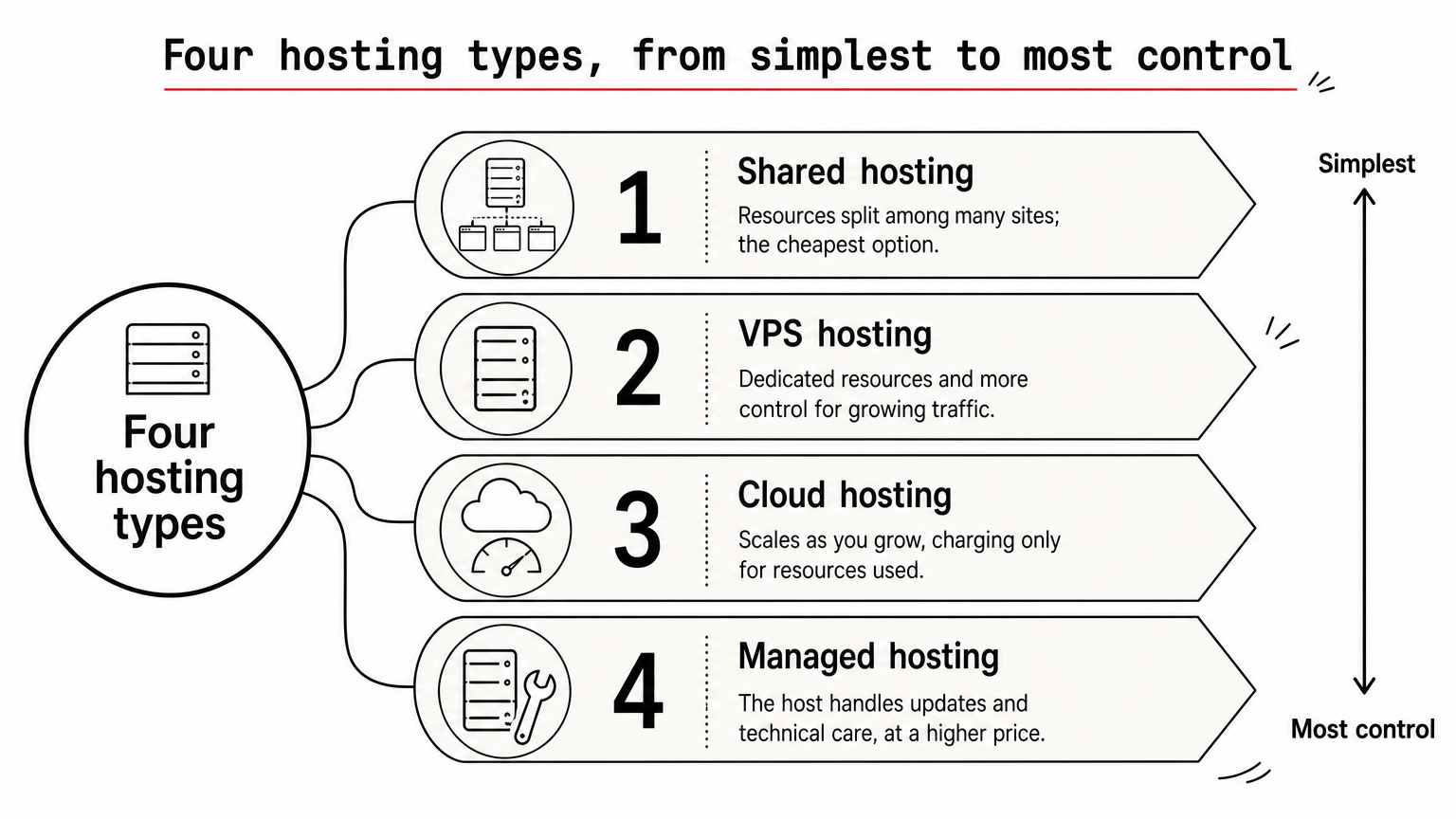
- Shared hosting: the cheapest option, with resources split among many sites. It suits brochure sites, blogs, and small shops.
- VPS hosting: dedicated resources and more control, with better performance for growing traffic and privacy needs.
- Cloud hosting: scales as you grow, and some plans charge only for resources used.
- Managed hosting: the host handles updates and technical care, at a higher price.
Dedicated servers are rarely necessary. A quality shared plan handles websites with up to tens of thousands of monthly visitors.
Check the features that protect revenue
Look for SSL, regular backups, a firewall, and malware scanning included in the price. Two-factor authentication on your account and automatic software updates add protection. For speed, favor LiteSpeed servers, SSD or NVMe storage, and a CDN. For uptime, treat a 99.9% guarantee as the floor.
Support deserves its own test. Open a chat before you buy and ask a technical question about migration or backups. The quality of that answer tells you more than any feature list.
Match the host to your platform
If you build on WordPress, Bluehost and SiteGround are both officially recommended by WordPress.org. If you want an all-in-one builder, tools like Wix or Squarespace bundle hosting with templates, at a higher monthly price than shared hosting and with less backend control.
If you are weighing GoDaddy, treat it like any other host. Compare renewal price, support, and included security, not brand recognition. Every host in this article is a credible alternative.
What small business web hosting costs
Most small businesses spend about $3 to $15 a month on shared hosting and $20 to $50 on VPS or managed plans. The number that matters is the renewal rate, not the first-term price.
Typical price ranges
These ranges show what web hosting services for small business usually cost by plan type.
| Plan type | Typical monthly cost | Who it suits |
|---|---|---|
| Free hosting | $0 | Testing an idea, not customer-facing sites |
| Entry shared hosting | $2 to $10 | Brochure sites, blogs, small shops |
| Business shared plans | $5 to $15 | Daily backups, CDN, more resources |
| VPS, cloud, or managed WordPress | $20 to $50 | Growing traffic and higher performance needs |
A worked example of promo versus regular pricing
Say a plan advertises $2.99 a month on a four-year term and lists at $11.99 a month on monthly billing. Hostinger's base plan appears at both figures, depending on the term. Over 48 months the long term costs $143.52, while monthly billing costs $575.52. That is a $432.00 difference.
The catch is that the long term is paid upfront, and renewal after it ends is higher. If you are unsure about the host, take a shorter term first and use the refund window to test speed and support. Move to the long term once you are confident.
Free hosting and when it makes sense
Free plans exist, and a few are ad-free, but they are tight. Usage limits can suspend a site for 24 hours, and some free hosts deactivate sites for low traffic. Use them to learn or stage a mockup, not to run a customer-facing business. A site that goes offline during a sale costs more than a year of paid shared hosting.
Picking your host with confidence
Hostinger is the safest starting point for most small businesses, with DreamHost, Bluehost, SiteGround, IONOS, ScalaHosting, and Hosting.com each winning in a specific situation. Whichever you choose, check the renewal price, test support before you buy, and use the refund window to measure real speed.
Hosting is only the first step in running a site that brings in customers. If you want more plain-language guides on websites, blogging, and the tools behind them, read more practical tech guides at Trick and Tech.


